Import Simulation Settings Using a LIN Description File
Overview
Schedule settings in master simulation and response data in slave simulation can be imported from a LIN Description File (LDF).
This reduces the effort required to enter schedules and response data manually.
Setup Procedure
Master Simulation
In master simulation, you can import the schedule information from an LDF into any schedule.
1. Select the simulation mode
Open Simulation Window from the main menu, then select Master Sim. for LIN Simulation Mode.
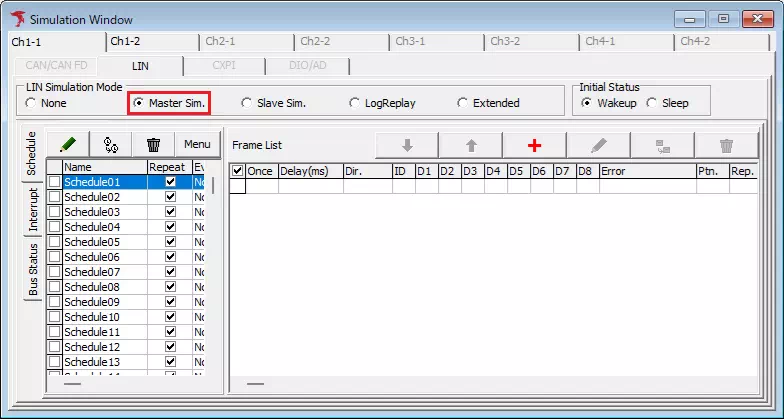
2. Select the schedule to import into
From Schedule List in the Schedule tab, select the schedule into which you want to import the schedule information from the LDF.
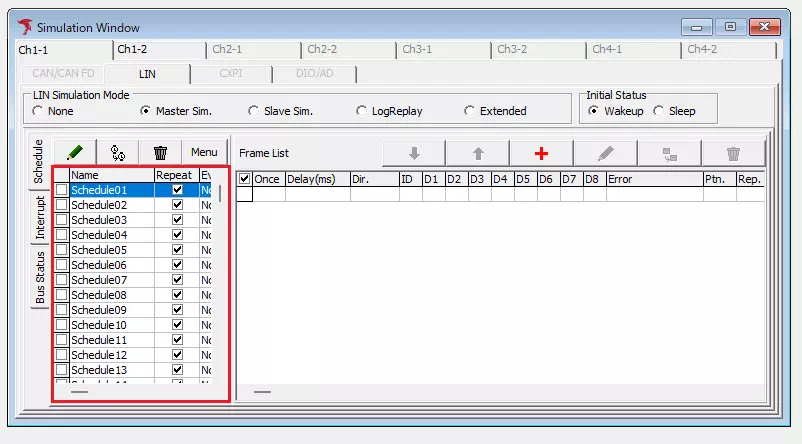
3. Load the LDF
Click the  button in the
 Schedule tab, then select Import From LDF from the displayed menu.
The file dialog appears, and you can select the LDF file to load.
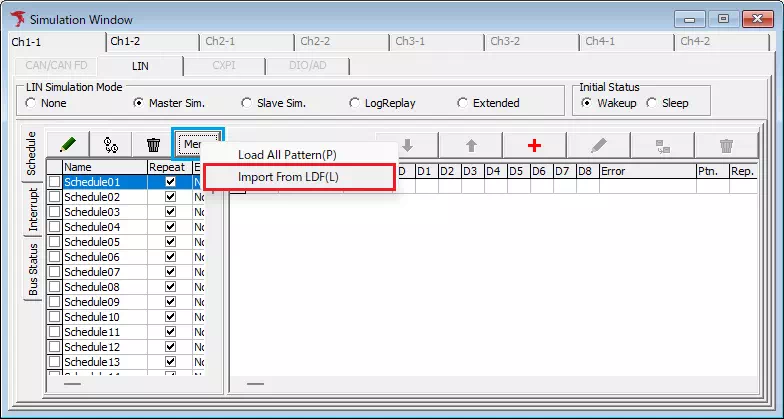
4. Select the schedule information to import
The Schedule Import dialog appears. Select the schedule information to import from Schedule Table List.
Frame List displays the frame list of the selected schedule information.
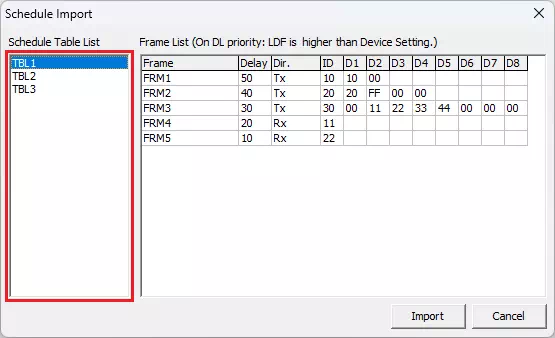
5. Import the schedule information
When you click the Import button in the Schedule Import dialog, the schedule information selected in step 4 is imported into the schedule selected in step 2.
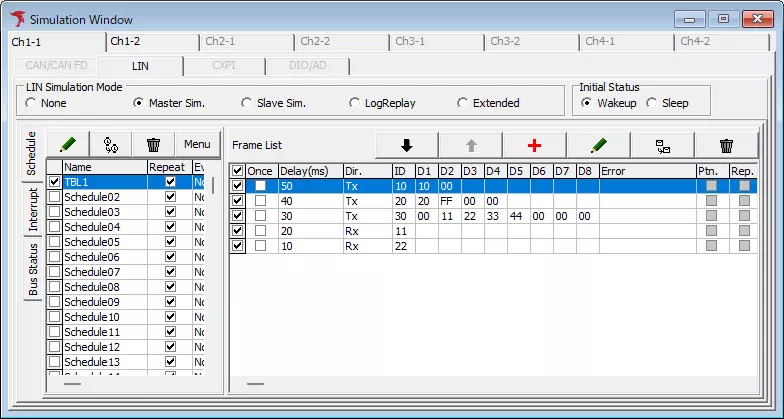
All frame information that had been registered in the destination schedule before the import is deleted.
Slave Simulation
In slave simulation, you can import the response settings included in the slave-node information in the LDF.
1. Select the simulation mode
Open Simulation Window from the main menu, then select Slave Sim. for LIN Simulation Mode.
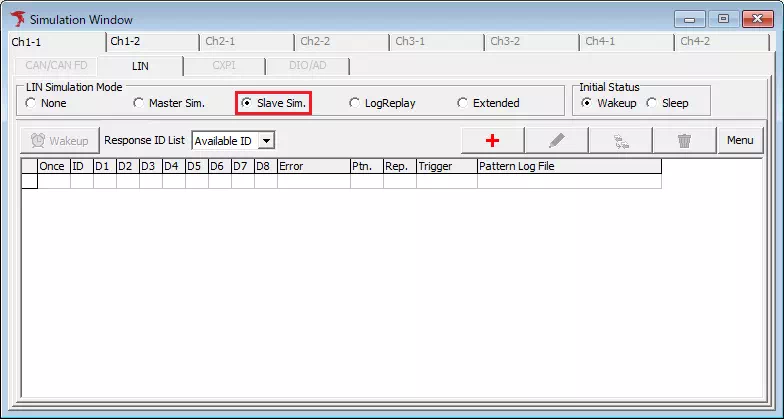
2. Load the LDF
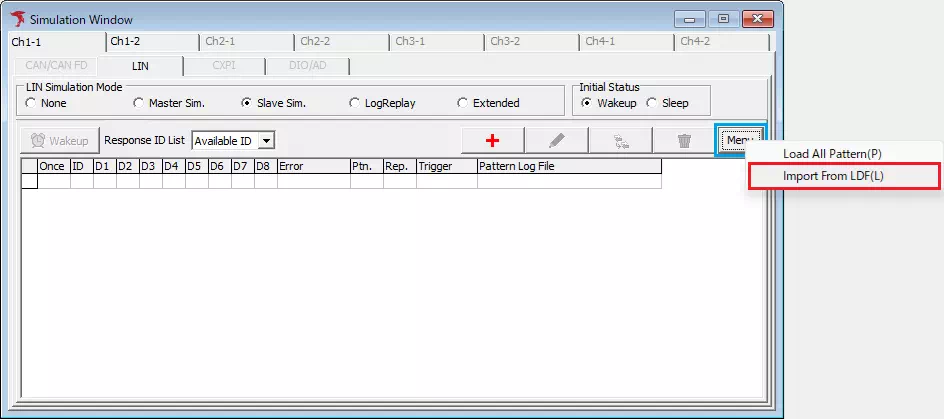
Click the button, then select Import From LDF from the displayed menu.
The file dialog appears, and you can select the LDF to load.
3. Select the slave node to import
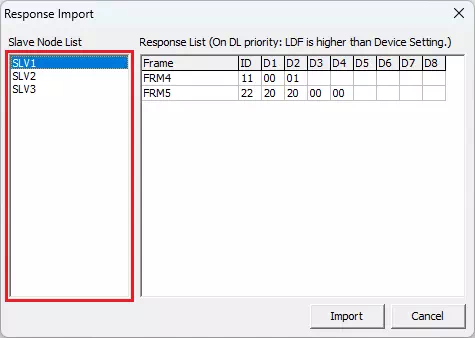
The Response Import dialog appears. Select the slave node to import from Slave Node List.
Response List displays the response list of the selected slave node.
4. Import the response list
When you click the Import button in the Response Import dialog, the response list of the slave node selected in step 3 is imported.
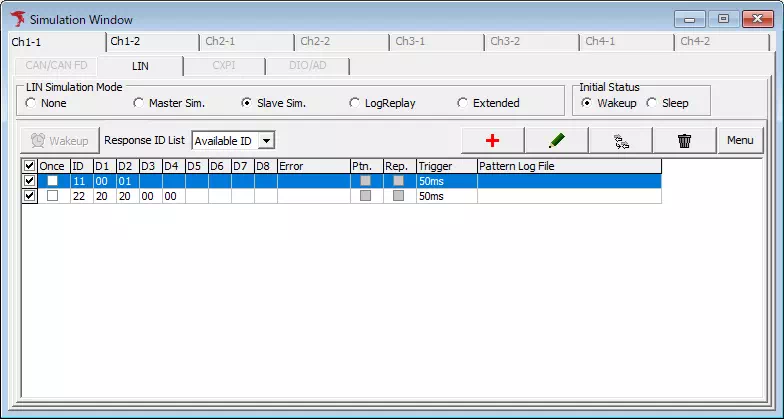
All response information that had been registered before the import is deleted.
LDF Loading Specifications
This product loads the following elements.
| Definition name | Required | Description |
|---|---|---|
| LIN_description_file | Yes | LDF declaration |
| Nodes | Yes | Node definition |
| Signals | Yes | Signal definition |
| Frames | Yes | Frame definition |
| Schedule_tables | Schedule table definition |
Details of Elements to Load
LDF Declaration
The notation format is as follows.
LIN_description_file;
Node Definition
The notation format is as follows.
Nodes {
  node_type;
  ...
}
There are two node types, and each uses a different notation format.
| Node type | Notation format |
|---|---|
| Master node | Master:node_name,main_period,jitter_time; |
| Slave node | Slaves:node_name,...; |
| Element | Required | Loading format | Notes |
|---|---|---|---|
| Node name | Yes | String | In a slave node, multiple node names can be listed separated by commas. If the same node name exists multiple times, the first detected one is valid and the others are invalid. |
| Main period | Floating-point number | If the value cannot be converted to a floating-point number, the setting becomes "0".This product does not use this value. | |
| Jitter time | Floating-point number | If the value cannot be converted to a floating-point number, the setting becomes "0".This product does not use this value. |
An error occurs if fewer than two node names are imported from the node definition.
Signal Definition
The notation format is as follows.
Signals {
  signal_name:data_length(bit),initial_value,response_node,receiving_node,...;
  ...
}
| Element | Required | Loading format | Notes |
|---|---|---|---|
| Signal name | Yes | String | If multiple settings exist for the same signal name, the first detected setting is valid and the others are invalid. |
| Data length (bit) | Yes | Decimal integer | Valid values are only the following. 1-16,24,32,40,48,56,64 The signal is invalid if any of the following applies. - The setting cannot be converted to a decimal integer - The setting is not a valid value |
| Initial value | Yes | Decimal integer or hexadecimal | If the value starts with 0x, it is treated as hexadecimal; otherwise it is treated as a decimal integer.It can also be written as comma-separated values one byte at a time, as shown below. {0x11,0x22,0x33,0x44}If the setting cannot be converted to a decimal integer or hexadecimal, the setting becomes "0". |
| Response node | Yes | String | If this node name was not imported in the node definition, that signal is invalid. |
| Receiving node | String | If this node name was not imported in the node definition, that signal is invalid. |
Frame Definition
The notation format is as follows.
Frames {
  frame_name:ID,response_node(,DL){
    signal_name,data_position(bit);
    signal_name,data_position(bit);
    ...
  }
}
| Element | Required | Loading format | Notes |
|---|---|---|---|
| Frame name | Yes | String | If multiple settings exist for the same frame name, the first detected setting is valid and the others are invalid. |
| ID | Yes | Decimal integer or hexadecimal | If the value starts with 0x, it is treated as hexadecimal; otherwise it is treated as a decimal integer.The frame is invalid if any of the following applies. - The setting cannot be converted to a decimal integer or hexadecimal - The setting is outside the range 0 (00H) to 63 (3FH) |
| Response node | Yes | String | If this node name was not imported in the node definition, that frame is invalid. |
| DL | Decimal integer | If the setting cannot be converted to a decimal integer, that frame is invalid. | |
| Signal name | Yes | String | If this signal name was not imported in the signal definition, that frame is invalid. |
| Data position (bit) | Yes | Decimal integer | If the setting cannot be converted to a decimal integer, that frame is invalid. |
An error occurs if no frames are imported from the frame definition.
Schedule Table Definition
The notation format is as follows.
Schedule_tables{
  table_name {
    frame_name delay delay_time;
    ...
  }
  ...
}
| Element | Required | Loading format | Notes |
|---|---|---|---|
| Table name | Yes | String | If multiple settings exist for the same table name, the first detected setting is valid and the others are invalid. |
| Frame name | Yes | String | If the frame information for this frame name was not imported in the frame definition, that frame is invalid. |
| Delay time | Yes | Decimal integer | In this product, the unit of delay time is fixed to milliseconds. If the setting cannot be converted to a decimal integer, that frame is invalid. |
If no valid frame exists in a schedule, that table name is invalid.