Microsoft Excel LIN Simulation Program
Screen Layout (Setting Sheet)
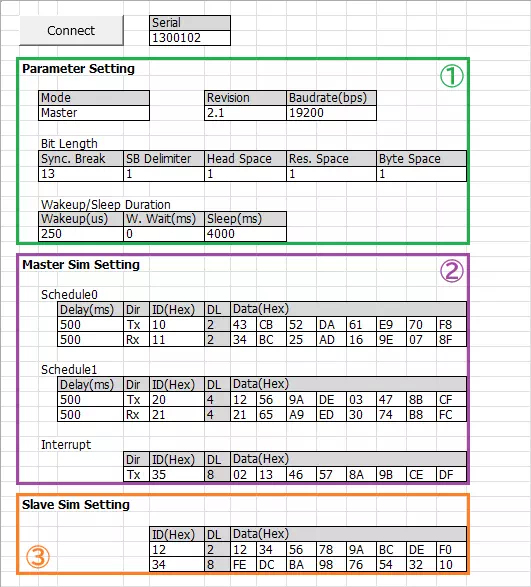
| Item | Description |
|---|---|
| Connect button | Detects MicroPeckerX connected to the PC. |
| Serial | Displays serial number of the detected MicroPeckerX. |
| Parameter Setting (area ①) | Sets simulation mode, LIN revision, baudrate, etc. |
| Master Sim Setting (area ②) | Sets transmission schedules and interrupt transmission frame for master simulation. |
| Slave Sim Setting (area ③) | Sets response ID list for slave simulation. |
Screen Layout (Monitoring Sheet)
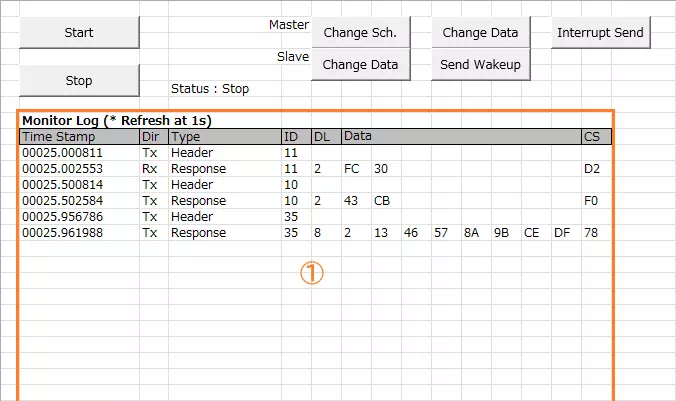
| Item | Description | |
|---|---|---|
| Start button | Starts monitoring and transmission based on transmission schedule (or responses based on response ID list). | |
| Stop button | Stops monitoring and transmission based on transmission schedule (or responses based on response ID list). | |
| Master | Change Sch. button | Switches active transmission schedule. See Transmission Schedule for details. |
| Change Data button | Changes D1 to FFH for the upper frame in current transmission schedule.See Transmission Schedule. | |
| Interrupt Send button | Sends interrupt transmission frame. See Interrupt Transmission Frame. | |
| Slave | Change Data button | Changes D1 to 00H for the upper response in response ID list.See Response ID List. |
| Send Wakeup button | Sends wakeup pulse. | |
| Status | Displays state of monitoring and schedule-based frame transmission (or response-list-based transmission). Start: running / Stop: stopped | |
| Monitor Log (area ①) | Displays transmitted/received logs. Logs update every second; previous logs are cleared at each update. If no logs are available, display is not updated and previous logs remain. See Monitor Log Details. | |
Monitor Log Details
| Item | Description |
|---|---|
| Time Stamp | Displays timestamp in sssss.mmmuuu format. |
| Dir | Displays log direction. Rx: receive log / Tx: transmit log |
| Type | Displays log type. |
| ID | Displays LIN ID in hexadecimal. |
| DL | Displays data length (1 to 8). |
| Data | Displays data (D1 to D8) in hexadecimal. |
| CS | Displays checksum in hexadecimal. |
Transmission Schedule
Details of each transmission schedule are as follows.
Dir, ID, Delay, and Data can be changed in the Setting sheet (DL is automatically adjusted according to ID).
| No. | Dir | ID | Delay | DL | Data (Hex) | |||||||
|---|---|---|---|---|---|---|---|---|---|---|---|---|
| D1 | D2 | D3 | D4 | D5 | D6 | D7 | D8 | |||||
| 0 (*1) | Tx | 10H | 500ms | 2 | 43H | CBH | ||||||
| Rx | 11H | 500ms | - | |||||||||
| 1 (*1) | Tx | 20H | 500ms | 4 | 12H | 56H | 9AH | DEH | ||||
| Rx | 21H | 500ms | - | |||||||||
Implementation Example (Source Code with Comments)
The VBA sample logic is included in MPXCtrl_LIN_ExcelVBA_Sample.xlsm.
MPXCtrlFree.bas contains API declarations, constants, and structure definitions. The following is an example using the same API sequence as the sample.
Option Explicit

Sub StartLinSimulation(ByVal mode As Byte)
    Dim dev(0 To 0) As StMPXDeviceInfo
    Dim count As Byte
    Dim ret As Long
    Dim serial As Long
    Dim p As StMPXLINParam

    ' 1) Open
    ret = MPXOpen(dev(0), 1, count)
    If ret <> E_OK Or count = 0 Then Exit Sub
    serial = dev(0).Serial

    ' 2) LIN parameter setting (mode: Monitor/Master/Slave)
    p.Mode = mode
    p.Revision = MPX_LIN_REV_21
    p.Baudrate = 19200
    p.SyncBreak = 13
    p.Delimiter = 1
    p.HeaderSpace = 1
    p.ResponseSpace = 1
    p.ByteSpace = 1
    ret = MPXLINSetParam(serial, p)
    If ret <> E_OK Then Exit Sub

    ' 3) Set log acquisition mode
    ret = MPXSetGetLogMode(serial, MPX_INNERCH_LIN, MPX_GETLOGMODE_GETLOGAPI)
    If ret <> E_OK Then Exit Sub

    ' 4) Set Master/Slave settings as needed
    ' Master: MPXLINSetMasterSchedule, MPXLINSetMasterSim, MPXLINSetStatus
    ' Slave : MPXLINSetSlaveSim

    ' 5) Start
    ret = MPXMonitorStart(serial, MPX_SYNC_MASTER)
End Sub

Sub StopLinSimulation(ByVal serial As Long)
    Dim ms As Long, us As Integer
    Call MPXMonitorStop(serial, ms, us)
    Call MPXClose
End Sub
*1: Active transmission schedule switches each time "Change Schedule" button is clicked.
Interrupt Transmission Frame
The interrupt transmission frame is as follows.
Dir, ID, and Data can be changed in the Setting sheet (DL is automatically adjusted according to ID).
| Dir | ID | DL | Data (Hex) | |||||||
|---|---|---|---|---|---|---|---|---|---|---|
| D1 | D2 | D3 | D4 | D5 | D6 | D7 | D8 | |||
| Tx | 35H | 8 | 02H | 13H | 46H | 57H | 8AH | 9BH | CEH | DFH |
Response ID List
The response ID list is as follows.
ID and Data can be changed in the Setting sheet (DL is automatically adjusted according to ID).
| ID | DL | Data (Hex) | |||||||
|---|---|---|---|---|---|---|---|---|---|
| D1 | D2 | D3 | D4 | D5 | D6 | D7 | D8 | ||
| 12H | 2 | 12H | 34H | ||||||
| 34H | 8 | FEH | DCH | BAH | 98H | 76H | 54H | 32H | 10H |