Notes for Microsoft .NET Framework
When using Microsoft .NET Framework (hereafter ".NET environment") as your development environment, structure and constant definitions differ from the native interface. For details, see the API reference below.
API Reference
Supported .NET Framework version is 4.0 or later.
The bundled samples have been used with v4.6 (C# sample) and v4.5.2 (SDK GUI sample).
Structure Definitions
In a .NET environment, structures are defined as value structs. Member variable types are changed to C++/CLI-compatible types, while member names and structure definitions remain unchanged. However, some structures are handled as exceptions.
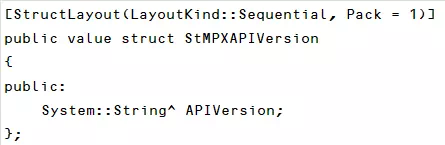
(1) In StMPXAPIVersion (API version information), the member APIVersion is defined as a string, as shown below.
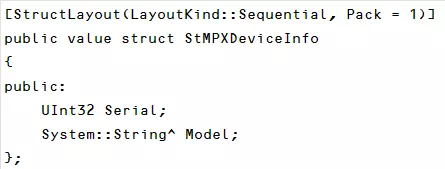
(2) In StMPXDeviceInfo (device information for MicroPeckerX), the member Model is defined as a string, as shown below.
Usage in Visual Studio
When using this SDK in C# or VB.NET, add the following wrapper DLL to your Visual Studio project references.
| .NET Environment | Wrapper DLL |
|---|---|
| 32-bit | MPXCtrldotNET40Free.dll |
| 64-bit | MPXCtrldotNET40Free_x64.dll |
Example Settings for 32-bit
The following is an example setup procedure when using Microsoft Visual C++ 2019 as the development environment.
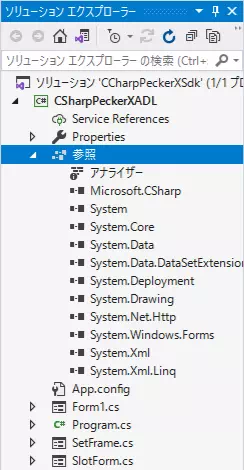
- Right-click
ReferencesinSolution Explorer.
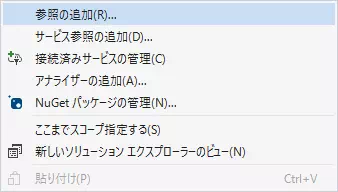
- Select
Add Reference...from the context menu.
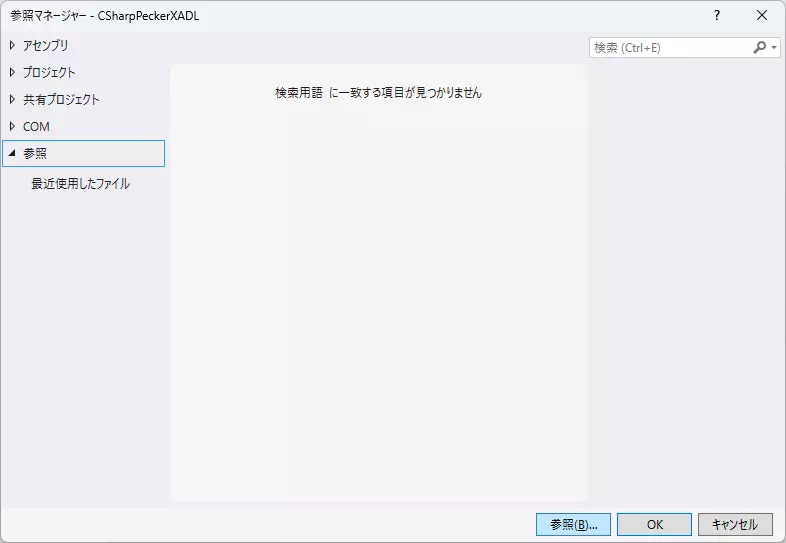
- In the
Reference Managerdialog, click theBrowsebutton and selectMPXCtrldotNET40Free.dllin the file dialog.
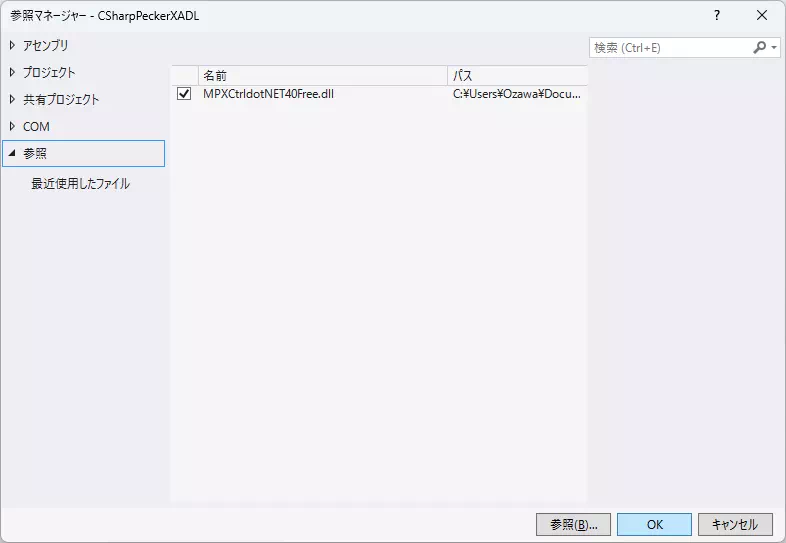
- Confirm
MPXCtrldotNET40Free.dllappears in the reference list and is checked, then clickOK.
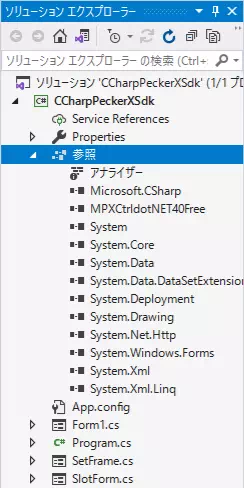
- Confirm
MPXCtrldotNET40Free.dllis added underReferencesinSolution Explorer.
If the DLL information file (same name as the wrapper DLL with extension changed to .xml) is stored in the same folder as the wrapper DLL, API details are shown in code completion.
Required DLLs at Runtime
Referencing only the wrapper DLL is not sufficient to run the application. At runtime, place the native DLL in the same folder as your executable.
| Runtime Process | Wrapper DLL | Native DLL |
|---|---|---|
| 32-bit | MPXCtrldotNET40Free.dll | MPXCtrlFree.dll |
| 64-bit | MPXCtrldotNET40Free_x64.dll | MPXCtrlFree_x64.dll |
For detailed bundled files, see Product Composition.
Match Bitness Exactly
- Do not load 64-bit DLLs in a 32-bit process.
- Do not load 32-bit DLLs in a 64-bit process.
- Even when using AnyCPU, unify referenced/deployed DLLs according to the runtime environment.
If bitness does not match, BadImageFormatException or DLL load failure occurs.
Initializing Array Members in C#
Some structures in the .NET wrapper contain array members.
After allocating the outer array with new, explicitly initialize array members of each element as well.
// Initialization example for CAN Slot/Log
var slots = new StMPXCANSlot[28];
for (int i = 0; i < slots.Length; i++)
{
    slots[i].Increment = new byte[64];
    slots[i].Frame.Data = new byte[64];
}

var canLogs = new StMPXCANLog[1024];
for (int i = 0; i < canLogs.Length; i++)
{
    canLogs[i].Data = new byte[64];
}

// Initialization example for LIN Sim/Log
var masterSims = new StMPXLINMasterSim[2];
for (int i = 0; i < masterSims.Length; i++)
{
    masterSims[i].Item = new StMPXLINMasterSimItem[64];
}

StMPXLINSlaveSim slaveSim = new StMPXLINSlaveSim();
slaveSim.Item = new StMPXLINSlaveSimItem[64];

var linLogs = new StMPXLINLog[1024];
for (int i = 0; i < linLogs.Length; i++)
{
    linLogs[i].Data = new byte[64];
}
Accessing them without initialization causes NullReferenceException.