Microsoft Visual C++ CAN Simulation Program
Screen Layout
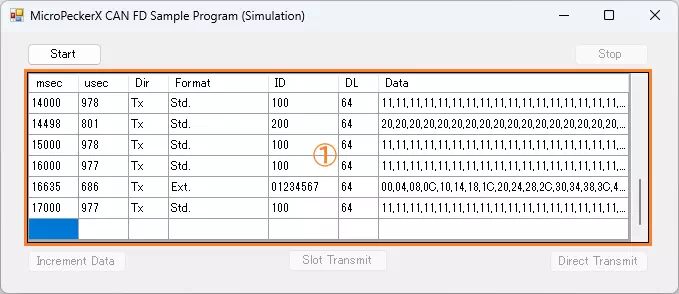
| Item | Description |
|---|---|
| Start button | Starts monitoring and transmission of periodic preset frames. |
| Stop button | Stops monitoring and transmission of periodic preset frames. |
| Log display area (area ①) | Displays transmitted/received log information. Up to 100 log entries are retained. If exceeded, older entries are cleared first. If monitoring is restarted after stopping, all previously displayed logs are cleared. For display content, see Log Display Details. |
| ChangeData button | Increments (+1) data bytes D1 to D64 of the periodic preset frame. |
| SlotSend button | Sends the event preset frame. |
| DirectSend button | Sends the direct transmit preset frame. |
Log Display Details
| Item | Description |
|---|---|
| msec | Displays timestamp (milliseconds). |
| usec | Displays timestamp (microseconds). |
| Dir | Displays log direction. Rx: receive log / Tx: transmit log |
| Format | Displays ID format. Std: standard ID / Ext: extended ID |
| ID | Displays CAN ID in hexadecimal. |
| DL | Displays data length (0 to 64). |
| Data | Displays data (D1 to D64) in hexadecimal, separated by commas. |
Preset Frames
Details of each preset frame are shown below.
| Frame Type | Slot | ID | DL | Data (Hex) | |||||
|---|---|---|---|---|---|---|---|---|---|
| Format | CAN ID | D1 | D2 | D3 | ... | D64 | |||
| Periodic preset frame (*1) | 0 | Standard ID | 100H | 64 | 10H | 10H | 10H | ... | 10H |
| Event preset frame (*1) | 1 | Standard ID | 200H | 64 | 20H | 20H | 20H | ... | 20H |
| Direct transmit preset frame | - | Extended ID | 01234567H | 64 | 00H | 04H | 08H | ... | FCH |
*1: D1 to D64 all have the same value.
Error Handling
The following cases are treated as errors. An error dialog is shown and the program exits.
- MicroPeckerX is not detected when the program starts.
- API calls fail at start/stop of monitoring, or during monitoring.
Implementation Example (Source Code with Comments)
Source: MPXCtrl_CANFD_CPP_SimSample/MPXCtrl_CANFD_CPP_SimSample/Form1.h
StMPXCANSlot slots[2] = {};

// 1) Open
StMPXDeviceInfo devices[1] = {};
unsigned char count = 0;
ER ret = MPXOpen(devices, 1, &count);
if (ret != E_OK || count == 0) return;
unsigned long serial = devices[0].Serial;

// 2) Set CH1=SIM, CH2=NONE
StMPXCANParam p = {};
p.Mode = MPX_CAN_MODE_SIM;
p.ArbitrationBaudrate = MPX_CAN_PARAM_ABR_500K;
p.ArbitrationSamplepoint = MPX_CAN_PARAM_SP_80P;
p.DataBaudrate = MPX_CAN_PARAM_DBR_2M;
p.DataSamplepoint = MPX_CAN_PARAM_SP_80P;
p.EnableTerminate = MPX_CAN_TERMINATE_ENABLE;
ret = MPXCANSetParam(serial, 1, &p);
if (ret != E_OK) return;
p.Mode = MPX_CAN_MODE_NONE;
ret = MPXCANSetParam(serial, 2, &p);
if (ret != E_OK) return;

// 3) Define slots (periodic + event)
for (int i = 0; i < 2; i++) {
  slots[i].SlotNo = i + 1;
  slots[i].FrameType.Enabled = MPX_CAN_SLOT_ENABLE;
  slots[i].FrameType.Option.Protocol = MPX_CAN_PROTOCOL_CANFD;
  slots[i].FrameType.Option.BRS = MPX_CAN_BRS_ENABLE;
  slots[i].Frame.ID.IDE = MPX_CAN_IDE_STD;
  slots[i].Frame.ID.RTR = MPX_CAN_RTR_DATA;
  slots[i].Frame.DL = 64;
  for (int j = 0; j < 64; j++) slots[i].Frame.Data[j] = (i + 1) * 0x10;
}
slots[0].Frame.ID.ID = 0x100;
slots[0].FrameType.FrameType = MPX_CAN_FRAME_TYPE_PERIODIC;
slots[1].Frame.ID.ID = 0x200;
slots[1].FrameType.FrameType = MPX_CAN_FRAME_TYPE_EVENT;
ret = MPXCANSetSlot(serial, 1, slots, 2);
if (ret != E_OK) return;

// 4) Configure log mode and start
MPXSetGetLogMode(serial, 1, MPX_GETLOGMODE_GETLOGAPI);
ret = MPXMonitorStart(serial, MPX_SYNC_MASTER);
if (ret != E_OK) return;

// 5) Button operations
// ChangeData: rewrite slot1 data and apply again
for (int i = 0; i < 64; i++) slots[0].Frame.Data[i] += 1;
MPXCANChangeSlot(serial, 1, 1, MPX_CAN_SLOT_ENABLE, MPX_CAN_SLOT_REQ_DATA, &slots[0].Frame);

// SlotSend: send event transmit slot immediately
MPXCANSendSlot(serial, 1, 2);

// DirectSend: send one frame immediately from PC
StMPXCANDirect direct = {};
direct.FrameType.Option.Protocol = MPX_CAN_PROTOCOL_CANFD;
direct.Frame.ID.IDE = MPX_CAN_IDE_EXT;
direct.Frame.ID.ID = 0x01234567;
direct.Frame.DL = 8;
ret = MPXCANDirectSend(serial, 1, &direct);