Composition
For detailed APIs and sequences, see the "Common", "CAN/CAN FD", and "LIN" sections according to your use case.
API Positioning
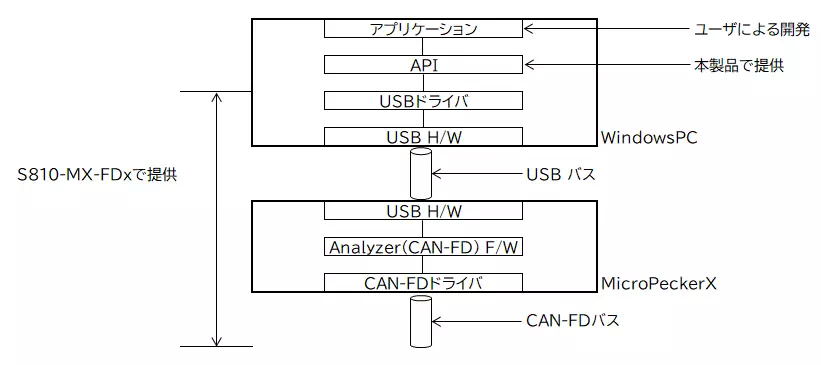
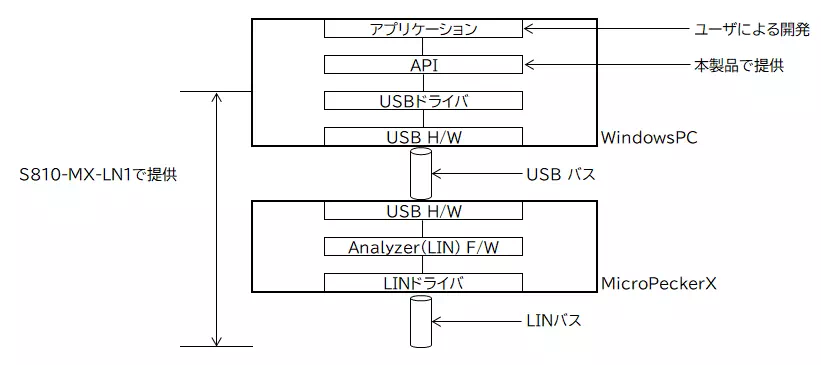
The relationship of the APIs provided by this product is shown below.
CAN/CAN FD Protocol
LIN Protocol
Package Composition
Library
The library folder structure of this product is shown below. "Storage Folder" indicates a folder path relative to the root.
| Type | Overview | File Name | Storage Folder |
|---|---|---|---|
| Common Service API | DLL file (32-bit) | MPXCtrlFree.dll | Library |
| DLL file (64-bit) | MPXCtrlFree_x64.dll | Library | |
| Microsoft Visual Basic .NET wrapper DLL file (32-bit) | MPXCtrldotNET40Free.dll | Library | |
| Microsoft Visual Basic .NET wrapper DLL file (64-bit) | MPXCtrldotNET40Free_x64.dll | Library | |
| Microsoft Visual Basic .NET DLL information file (32-bit) | MPXCtrldotNET40Free.xml | Library | |
| Microsoft Visual Basic .NET DLL information file (64-bit) | MPXCtrldotNET40Free_x64.xml | Library | |
| Library definition file | MPXCtrlFree.h | Library | |
| Microsoft Visual C++ library file (32-bit) | MPXCtrlFree.lib | Library | |
| Microsoft Visual C++ library file (64-bit) | MPXCtrlFree_x64.lib | Library | |
| Embarcadero C++ Builder library file (32-bit) | MPXCtrlFree_BCB.lib | Library | |
| Embarcadero C++ Builder library file (64-bit) | MPXCtrlFree_x64.a | Library | |
| Microsoft Excel library definition file | MPXCtrlFree.bas | Library |
When developing applications with this product, you need the following definition files or wrapper DLL files (all located in the Library folder), depending on your development environment.
| Development Environment | Definition File / Wrapper DLL File |
|---|---|
| Microsoft Visual C++ (32-bit) | MPXCtrlFree.h (definition file) MPXCtrlFree.lib (library file) |
| Microsoft Visual C++ (64-bit) | MPXCtrlFree.h (definition file) MPXCtrlFree_x64.lib (library file) |
| Microsoft Visual C# (32-bit) | MPXCtrldotNET40Free.dll (wrapper DLL file) (*1) MPXCtrldotNET40Free.xml (DLL information file) (*2) |
| Microsoft Visual C# (64-bit) | MPXCtrldotNET40Free_x64.dll (wrapper DLL file) (*1) MPXCtrldotNET40Free_x64.xml (DLL information file) (*2) |
| Microsoft Visual Basic .NET (32-bit) | MPXCtrldotNET40Free.dll (wrapper DLL file) (*1) MPXCtrldotNET40Free.xml (DLL information file) (*2) |
| Microsoft Visual Basic .NET (64-bit) | MPXCtrldotNET40Free_x64.dll (wrapper DLL file) (*1) MPXCtrldotNET40Free_x64.xml (DLL information file) (*2) |
| Embarcadero C++ Builder (32-bit) | MPXCtrlFree.h (definition file) MPXCtrlFree_BCB.lib (library file) |
| Embarcadero C++ Builder (64-bit) | MPXCtrlFree.h (definition file) MPXCtrlFree_x64.a (library file) |
| Microsoft Excel | MPXCtrlFree.bas (definition file) (*3) |
| Python (32-bit) | MPXCtrlFree.h (definition file) MPXCtrlFree.lib (library file) |
| Python (64-bit) | MPXCtrlFree.h (definition file) MPXCtrlFree_x64.lib (library file) |
*1: You need to reference the wrapper DLL file in your project. For details, see Notes for Microsoft .NET Framework.
*2: For DLL information files, see Notes for Microsoft .NET Framework.
*3: The definition file is common for both 32-bit and 64-bit.
To run applications developed with this product, place MPXCtrlFree.dll for 32-bit, or MPXCtrlFree_x64.dll for 64-bit, in the same folder as the application executable.
If using Microsoft .NET Framework, the wrapper DLL corresponding to your development environment is also required.
Sample Programs
| Type | Overview | Storage Folder |
|---|---|---|
| Sample Programs for CAN FD | C++ monitor program | SampleProgram\MPXCtrl_CANFD_CPP_MonSample |
| C++ simulation program | SampleProgram\MPXCtrl_CANFD_CPP_SimSample | |
| C# monitor/simulation program | SampleProgram\MPXCtrl_CANFD_CSharp_Sample | |
| Excel VBA monitor/simulation program | SampleProgram\MPXCtrl_CANFD_ExcelVBA_Sample | |
| Python monitor program | SampleProgram/MPXCtrl_CANFD_Python_MonSample | |
| Python simulation program | SampleProgram/MPXCtrl_CANFD_Python_SimSample | |
| Sample Programs for LIN | C++ monitor program | SampleProgram\MPXCtrl_LIN_CPP_MonSample |
| C++ master simulation program | SampleProgram\MPXCtrl_LIN_CPP_MstSample | |
| C++ slave simulation program | SampleProgram\MPXCtrl_LIN_CPP_SlvSample | |
| C# monitor/simulation program | SampleProgram\MPXCtrl_LIN_CSharp_Sample | |
| Excel VBA monitor/simulation program | SampleProgram\MPXCtrl_LIN_ExcelVBA_Sample | |
| Python monitor program | SampleProgram\MPXCtrl_LIN_Python_MonSample | |
| Python master simulation program | SampleProgram/MPXCtrl_LIN_Python_MstSample | |
| Python slave simulation program | SampleProgram/MPXCtrl_LIN_Python_SlvSample |
For sample program details and usage, see CAN/CAN FD Sample Programs and LIN Sample Programs.
Tools for MicroPeckerX
| Type | Overview | Storage Folder |
|---|---|---|
| USB Driver for MicroPeckerX | Install this USB driver on PCs that connect MicroPeckerX for the first time. | USBDriver\DpinstCall.exe |
| MicroPeckerX Update Tool | Tool for updating the firmware of the MicroPeckerX unit. Normally not used. | UpdateTool\MPXUpdateTool.exe |
Installing the USB Driver for MicroPeckerX
Install the USB driver compatible with MicroPeckerX.
Run DpinstCall.exe in the USBDriver folder.
For details, refer to the following manual.
USB Driver Installation Manual for MicroPeckerX