Microsoft Visual C# LIN Simulation Program
Screen Layout
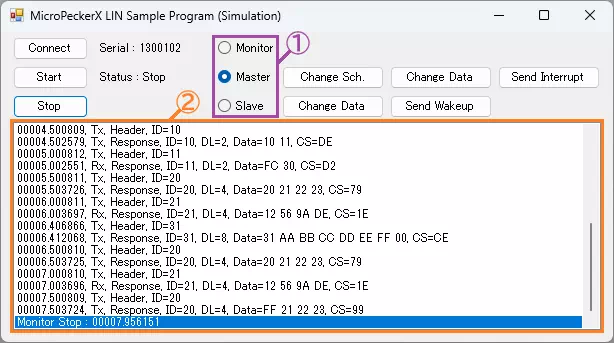
| Item | Description | |
|---|---|---|
| Connect button | Detects MicroPeckerX connected to the PC. | |
| Serial | Displays serial number of detected MicroPeckerX. | |
| Simulation mode (area ①) | Select simulation mode with radio buttons. Monitor: monitor only / Master: master simulation / Slave: slave simulation | |
| Master | Change Schedule button | Switches active transmission schedule. See Transmission Schedule for details. |
| Change Data button | Changes D1 to FFH for Tx frame in currently selected schedule.See Transmission Schedule for details. | |
| Interrupt Send button | Sends interrupt transmission frame. See Interrupt Transmission Frame for details. | |
| Slave | Change Data button | Changes D1 to 00H for response with LIN ID 12H in response ID list.See Response ID List for details. |
| Send Wakeup button | Sends wakeup pulse. | |
| Start button | Starts monitoring and transmission based on transmission schedule (or responses based on response ID list). | |
| Stop button | Stops monitoring and transmission based on transmission schedule (or responses based on response ID list). | |
| Status | Displays status of monitoring and schedule-based transmission (or response-list-based transmission). Start: running / Stop: stopped | |
| Log display area (area ②) | Displays transmitted/received logs. This sample acquires up to 1024 logs per API call. No upper limit for retained rows is implemented. For long operation, add row-limit and old-row deletion in the application. See Log Display Details. | |
Log Display Details
Display format is as follows. Fields are comma-separated.
| # | Item | Description |
|---|---|---|
| 1 | (no field name) | Timestamp in sssss.mmmuuu format |
| 2 | (no field name) | Log direction Rx: receive log / Tx: transmit log |
| 3 | (no field name) | Log type |
| 4 | ID | LIN ID in hexadecimal |
| 5 | DL | Data length (1 to 8) |
| 6 | Data | Data (D1 to D8) in hexadecimal (space-separated) |
| 7 | CS | Checksum in hexadecimal |
Transmission Schedule
Details of each transmission schedule are as follows.
| No. | Dir | ID | Delay | DL | Data (Hex) | |||||||
|---|---|---|---|---|---|---|---|---|---|---|---|---|
| D1 | D2 | D3 | D4 | D5 | D6 | D7 | D8 | |||||
| 0 (*1) | Tx | 10H | 500ms | 2 | 10H | 11H | ||||||
| Rx | 11H | 500ms | - | |||||||||
| 1 (*1) | Tx | 20H | 500ms | 4 | 20H | 21H | 22H | 23H | ||||
| Rx | 21H | 500ms | - | |||||||||
Implementation Example (Source Code with Comments)
Source: MPXCtrl_LIN_CSharp_Sample/MPXCtrl_LIN_CSharp_Sample/Form1.cs
private void Form1_Load(object sender, EventArgs e)
{
    // 1) Explicitly initialize array members
    MasterSims = new StMPXLINMasterSim[2];
    for (int i = 0; i < 2; i++) MasterSims[i].Item = new StMPXLINMasterSimItem[64];
    SlaveSim.Item = new StMPXLINSlaveSimItem[64];
    Logs = new StMPXLINLog[1024];
    for (int i = 0; i < 1024; i++) Logs[i].Data = new byte[64];
}

private void StartButton_Click(object sender, EventArgs e)
{
    // 2) Open
    var info = new StMPXDeviceInfo[1];
    byte count = 0;
    int ret = MPXCtrl.Open(ref info, 1, ref count);
    if (ret != MPXConst.E_OK || count == 0) return;
    Serial = info[0].Serial;

    // 3) Set LIN parameters
    var p = new StMPXLINParam();
    p.Mode = MPXConst.MPX_LIN_MODE_MONITOR;
    if (radioButton2.Checked) p.Mode = MPXConst.MPX_LIN_MODE_MASTER;
    else if (radioButton3.Checked) p.Mode = MPXConst.MPX_LIN_MODE_SLAVE;
    p.Revision = MPXConst.MPX_LIN_REV_21;
    p.Baudrate = 19200;
    p.IDSetting = new StMPXLINIDSetting[64];
    ret = MPXCtrl.LINSetParam(Serial, ref p);
    if (ret != MPXConst.E_OK) return;

    // 4) Set log acquisition mode
    ret = MPXCtrl.SetGetLogMode(Serial, MPXConst.MPX_INNERCH_LIN, MPXConst.MPX_GETLOGMODE_GETLOGAPI);
    if (ret != MPXConst.E_OK) return;

    // 5) Register mode-specific settings (Master/Slave) and start
    // Master: LINSetMasterSchedule + LINSetMasterSim + LINChangeMasterSchedule + LINSetStatus
    // Slave : LINSetSlaveSim
    ret = MPXCtrl.MonitorStart(Serial, MPXConst.MPX_SYNC_MASTER);
}

private void timer1_Tick(object sender, EventArgs e)
{
    // 6) Get logs
    ushort count = 0, num = 1024;
    byte over = 0;
    int ret = MPXCtrl.LINGetLogEx(Serial, ref Logs, num, ref count, ref over);
    if (ret != MPXConst.E_OK) timer1.Enabled = false;
}
*1: Active schedule switches each time the "Change Schedule" button is clicked.
Interrupt Transmission Frame
The interrupt transmission frame is as follows.
| Dir | ID | DL | Data (Hex) | |||||||
|---|---|---|---|---|---|---|---|---|---|---|
| D1 | D2 | D3 | D4 | D5 | D6 | D7 | D8 | |||
| Tx | 31H | 8 | 31H | AAH | BBH | CCH | DDH | EEH | FFH | 00H |
Response ID List
The response ID list is as follows.
| ID | DL | Data (Hex) | |||||||
|---|---|---|---|---|---|---|---|---|---|
| D1 | D2 | D3 | D4 | D5 | D6 | D7 | D8 | ||
| 12H | 2 | AAH | BBH | ||||||
| 34H | 8 | 01H | 23H | 45H | 67H | 89H | ABH | CDH | EFH |