Microsoft Visual C++ CAN Monitor Program
Screen Layout
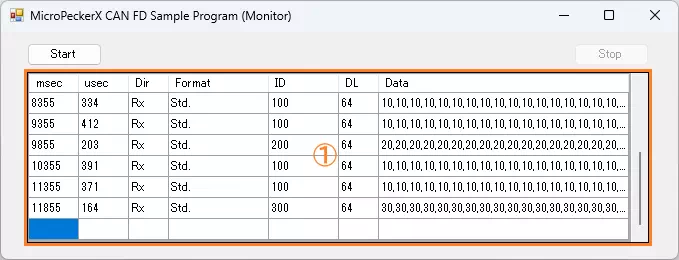
| Item | Description |
|---|---|
| Start button | Click to start monitoring. |
| Stop button | Click to stop monitoring. |
| Log display area (Area 1) | Displays received log information. Up to 100 logs are retained. If exceeded, oldest logs are cleared first. When monitoring is restarted after stop, previous logs are all cleared. See Log Display Details. |
Log Display Details
| Item | Description |
|---|---|
| msec | Timestamp (milliseconds). |
| usec | Timestamp (microseconds). |
| Dir | Log direction. Rx: receive log, Tx: transmit log |
| Format | ID format. Std: standard ID, Ext: extended ID |
| ID | CAN ID in hexadecimal. |
| DL | Data length (0 to 64). |
| Data | Data (D1 to D64) in hexadecimal, comma-separated. |
Error Handling
Program terminates with an error dialog in the following cases.
- MicroPeckerX could not be recognized at program startup
- API call failed at monitoring start/stop or during monitoring
Implementation Example (Commented Source)
Source: MPXCtrl_CANFD_CPP_MonSample/MPXCtrl_CANFD_CPP_MonSample/Form1.h
// 1) Connect and initialize
StMPXDeviceInfo devices[1] = {};
unsigned char count = 0;
ER ret = MPXOpen(devices, 1, &count);
if (ret != E_OK || count == 0) {
    // device not found
    return;
}
unsigned long serial = devices[0].Serial;
MPXSetLED(serial, MPX_LED_OFF, MPX_LED_OFF, MPX_LED_OFF, MPX_LED_OFF, MPX_LED_OFF);

// 2) CAN parameter setup (monitor CH1 only, disable CH2)
StMPXCANParam ch1 = {};
ch1.Mode = MPX_CAN_MODE_MONITOR;
ch1.ArbitrationBaudrate = MPX_CAN_PARAM_ABR_500K;
ch1.ArbitrationSamplepoint = MPX_CAN_PARAM_SP_80P;
ch1.DataBaudrate = MPX_CAN_PARAM_DBR_2M;
ch1.DataSamplepoint = MPX_CAN_PARAM_SP_80P;
ch1.EnableTerminate = MPX_CAN_TERMINATE_ENABLE;
ret = MPXCANSetParam(serial, 1, &ch1);
if (ret != E_OK) return;

StMPXCANParam ch2 = ch1;
ch2.Mode = MPX_CAN_MODE_NONE;
ret = MPXCANSetParam(serial, 2, &ch2);
if (ret != E_OK) return;

// 3) Fix log acquisition mode to API mode
MPXSetGetLogMode(serial, 1, MPX_GETLOGMODE_GETLOGAPI);

// 4) Start monitoring
ret = MPXMonitorStart(serial, MPX_SYNC_MASTER);
if (ret != E_OK) return;

// 5) Periodic log acquisition
StMPXCANLog logs[100];
unsigned short got = 0;
unsigned char over = 0;
ret = MPXCANGetLogEx(serial, 1, logs, 100, &got, &over);
// Display got logs. If over==MPX_LOG_BUFOVER_TRUE, some logs were dropped.

// 6) Stop and close
unsigned long mSec = 0;
unsigned short uSec = 0;
MPXMonitorStop(serial, &mSec, &uSec);
MPXClose();