Microsoft Visual C++ LIN Slave Simulation Program
Screen Layout
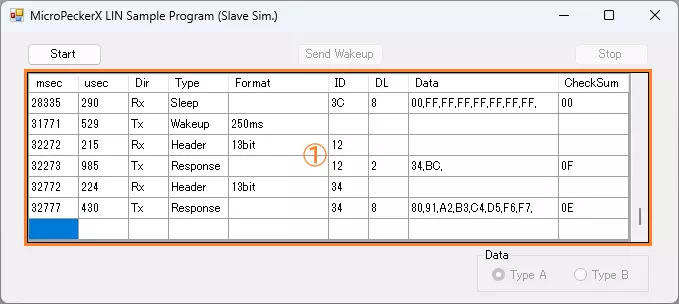
| Item | Description |
|---|---|
| Start button | Starts monitoring and response transmission based on the response ID list. |
| Send Wakeup button | Sends a wakeup pulse. |
| Stop button | Stops monitoring and response transmission based on the response ID list. |
| Log display area (area ①) | Displays transmitted/received log information. Up to 100 log entries are retained. If exceeded, older entries are cleared first. If monitoring is restarted after stopping, all previously displayed logs are cleared. For display content, see Log Display Details. |
| Data | Switches response data in the response ID list using radio buttons. For response details, see Response ID List. |
Log Display Details
| Item | Description |
|---|---|
| msec | Displays timestamp (milliseconds). |
| usec | Displays timestamp (microseconds). |
| Dir | Displays log direction. Rx: receive log / Tx: transmit log |
| Type | Displays log type or error content. |
| Format | Displays the following depending on log type. Header: SyncBreak width / Wakeup: wakeup pulse width |
| ID | Displays LIN ID in hexadecimal. |
| DL | Displays data length (1 to 8). |
| Data | Displays data (D1 to D8) in hexadecimal, separated by commas. |
| Checksum | Displays checksum in hexadecimal. |
Response ID List
The response ID list is as follows.
| ID | DL | Data (Hex) | |||||||
|---|---|---|---|---|---|---|---|---|---|
| D1 | D2 | D3 | D4 | D5 | D6 | D7 | D8 | ||
| 12H (*1) | 2 | 34H | BCH | ||||||
| 2 | 70H | F8H | |||||||
| 34H (*1) | 8 | 80H | 91H | A2H | B3H | C4H | D5H | E6H | F7H |
| 8 | FBH | EAH | D9H | C8H | 73H | 62H | 51H | 40H | |
*1: If Type A is selected in the Data radio buttons, the upper row is used. If Type B is selected, the lower row is used.
Error Handling
The following cases are treated as errors. An error dialog is shown and the program exits.
- MicroPeckerX is not detected when the program starts.
- API calls fail at start/stop of monitoring, or during monitoring.
Implementation Example (Source Code with Comments)
Source: MPXCtrl_LIN_CPP_SlvSample/MPXCtrl_LIN_CPP_SlvSample/Form1.h
// 1) Open
StMPXDeviceInfo devices[1] = {};
unsigned char count = 0;
ER ret = MPXOpen(devices, 1, &count);
if (ret != E_OK || count == 0) return;
unsigned long serial = devices[0].Serial;

// 2) Set parameters for LIN Slave
StMPXLINParam lin = {};
lin.Mode = MPX_LIN_MODE_SLAVE;
lin.Revision = MPX_LIN_REV_21;
lin.Baudrate = 19200;
ret = MPXLINSetParam(serial, &lin);
if (ret != E_OK) return;

// 3) Set response ID list
StMPXLINSlaveSim slave = {};
// Configure response frames for ID=0x12 and ID=0x34
slave.Item[0x12].Enabled = MPX_LIN_SIM_ENA;
slave.Item[0x34].Enabled = MPX_LIN_SIM_ENA;
ret = MPXLINSetSlaveSim(serial, &slave);
if (ret != E_OK) return;

// 4) Configure log mode and start
MPXSetGetLogMode(serial, MPX_INNERCH_LIN, MPX_GETLOGMODE_GETLOGAPI);
ret = MPXMonitorStart(serial, MPX_SYNC_MASTER);
if (ret != E_OK) return;

// 5) Optional operations
// Send wakeup
MPXLINSlaveWakeup(serial);

// Change data for ID=0x12 dynamically
StMPXLINSlaveSimItem item = slave.Item[0x12];
item.Frame.Data[0] = 0x00;
MPXLINChangeSlaveItem(serial, 0x12, &item);

// 6) Stop
unsigned long mSec = 0;
unsigned short uSec = 0;
MPXMonitorStop(serial, &mSec, &uSec);
MPXClose();