Log File Specification
Log File
MicroPeckerX CAN FD Analyzer outputs acquired data to CSV log files.
The log file content is described below.
Log File Sample
A sample log file is shown below.
Both header and data sections are output.
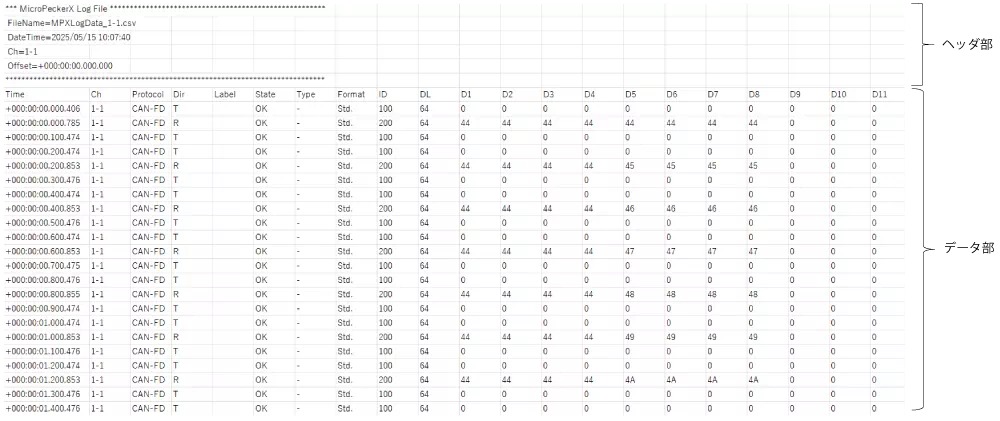
Header Section
When logging starts, header information (main window settings) is output to the log file.
Output items are as follows.
| Item | Data |
|---|---|
| FileName | File name |
| DateTime | Date/time when logging started (YYYY/MM/DD_hh:mm:ss) |
| Ch | Logged channel |
| Offset | Offset time used for Time in data section |
Data Section
One monitored frame is output as one row.
Output items are as follows.
| Item | Data |
|---|---|
| Time | Time of transmission/reception |
| Ch | Channel of transmission/reception |
| Protocol | Protocol of transmission/reception |
| Dir | Transmit (T) / Receive (R) |
| Label | Label set in Label Filter |
| State | OK / NG |
| Type | Data Frm. / Remote Frm. / Ack Err. / Error / OverLoad Frm. |
| Format | Standard ID (Std) / Extended ID (Ext) |
| ID | Transmitted/received ID in hexadecimal |
| DL | Transmitted/received DLC |
| D1~D64 | Transmitted/received data in hexadecimal |
File Name
The log file storage folder and file naming rules are as follows.
Storage folder:
<Logging Folder text>\<Serial No. shown in No label>
Log file name:
<Logging File Name text> + "_" + <Ch number (1-1~4-2)> + ".csv"
If the storage folder already exists at logging start, No is incremented (+1) and a new storage folder is created.
If the incremented folder also exists, incrementation continues until a non-existing folder is found.
If No exceeds 999, an error is shown and the analyzer cannot start. Change Logging Folder.