Communication Settings
Configure communication settings for connected MicroPeckerX in the Device Window.
Always configure this before starting monitoring.
Basic Operation
The communication setup flow is as follows.
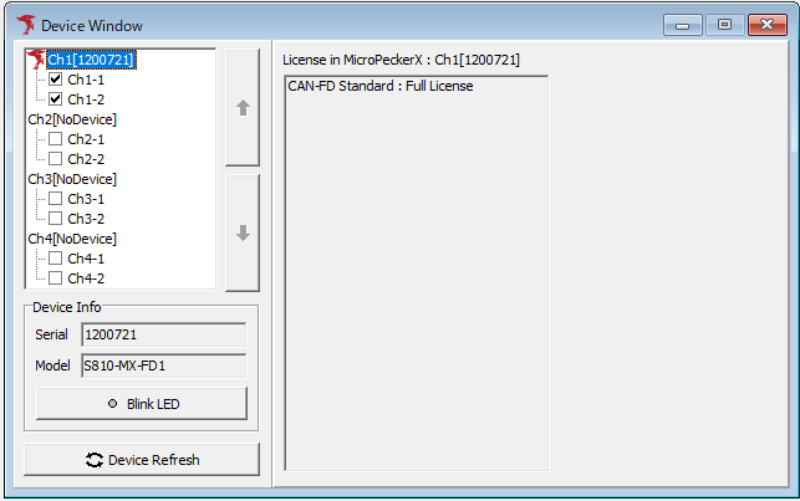
- Open Device Window
SelectDevice Windowfrom the menu or toolbar.
-
Select target channel
Click a connected channel (Ch1-1/Ch1-2) and theProtocol Settingarea switches to communication settings.
When connecting MicroPeckerX to multi-channel CAN buses, configure each channel individually. -
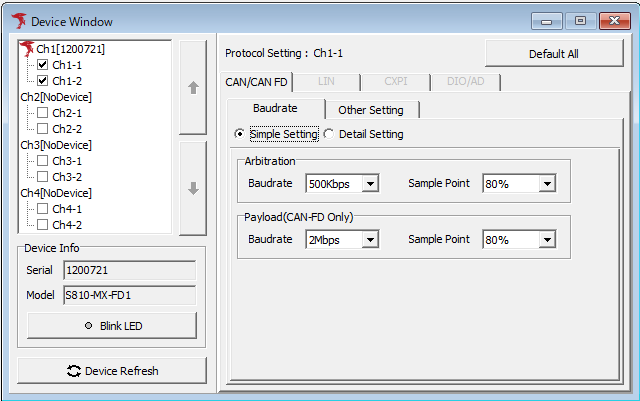
Baudrate settings
In theBaudratetab of Protocol Setting, you can select CAN bus baud rate and sample point from presets.
Payload settings are available only for CAN FD.
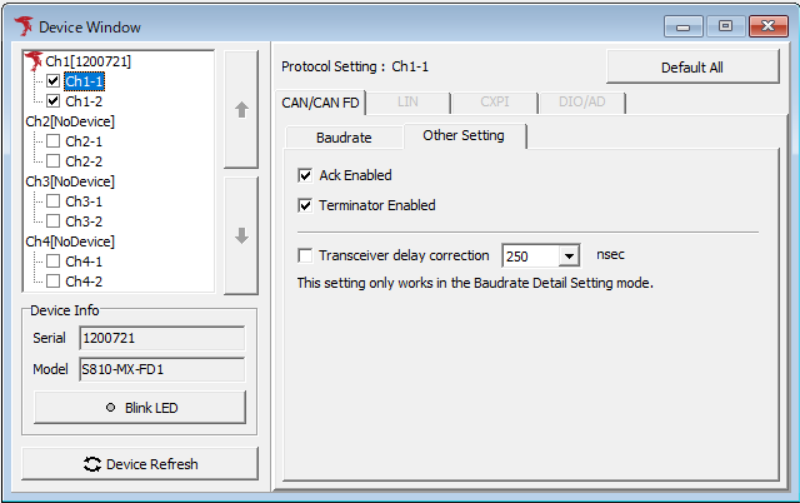
- Ack response and terminator settings
In theOther Settingtab of Protocol Setting, you can set Ack response from MicroPeckerX and terminator ON/OFF.
Communication settings are now complete.
Device Window Description
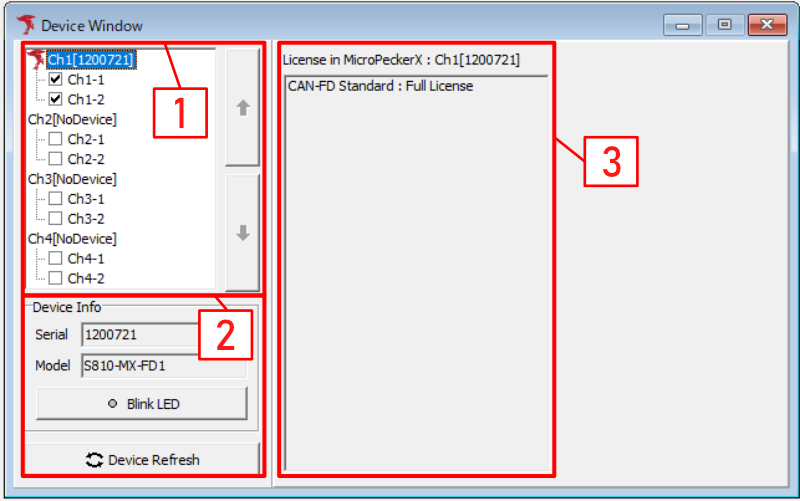
| No. | Item | Description |
|---|---|---|
| 1 | Device List | Shows a list of connected MicroPeckerX units. You can enable/disable each channel with checkboxes. |
| Up/Down buttons | When multiple MicroPeckerX units are connected, select a target unit and click up/down to change connected channel order. | |
| 2 | Device Info | Displays serial number and model of the MicroPeckerX selected in Device List. |
| Serial | Displays serial number of selected MicroPeckerX. | |
| Model | Displays model of selected MicroPeckerX. | |
| Blink LED button | Blinks LED on selected MicroPeckerX to identify the target unit. Clicking the button blinks green and yellow LEDs. Click again to stop blinking. | |
| Device Refresh button | Re-detects MicroPeckerX devices connected to the PC. | |
| 3 | Protocol Setting | Shows licenses registered on the selected MicroPeckerX in Device List. If no device is recognized, No Device is displayed.Selecting each channel in Device List displays communication setting screen. |
Baudrate Tab
Click each channel in Device List to display communication settings. In the Baudrate tab, you can configure communication baud rate and sample point.
There are Simple Setting, which allows easy setup using presets, and Detail Setting, which allows detailed setup.
Simple Setting
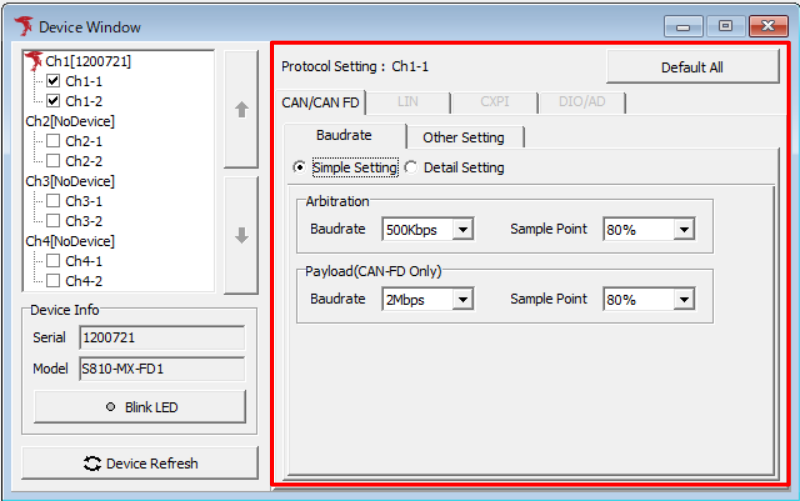
In Simple Setting, you can select CAN/CAN FD communication settings from pull-down menus.
| Item | Description | |
|---|---|---|
| Protocol Setting | Displays selected channel information. | |
| Baudrate/Other Setting tab switch | Switches Protocol Setting display between Baudrate and Other Setting. | |
| Simple Setting / Detail Setting | Switches the communication setting method. Simple Setting selects presets, and Detail Setting directly sets bit timing. | |
| Arbitration (note1) | Baudrate | Sets communication baud rate. Select from: 1 M, 500 k, 250 k, 125 k [bps] |
| Sample Point | Sets sample point. Select from: 60, 65, 70, 75, 80, 85 [%] | |
| Payload (CAN FD Only) (note2) | Baudrate | Sets communication baud rate for CAN FD payload. Select from: 5 M, 4 M, 2 M, 1 M, 500 k [bps] |
| Sample Point | Sets sample point. Select from: 60, 70, 80 [%] | |
| Default All button | Sets Protocol Setting of target channel to default values. Defaults are: - Arbitration: Baudrate 500 kbps, Sample Point 80% - Payload (CAN FD Only): Baudrate 2 Mbps, Sample Point 80% | |
note1: Available Sample Point combinations vary by Baudrate.
note2: Valid for CAN FD. Payload Baudrate/Sample Point combinations vary depending on Arbitration Baudrate.
Detail Setting
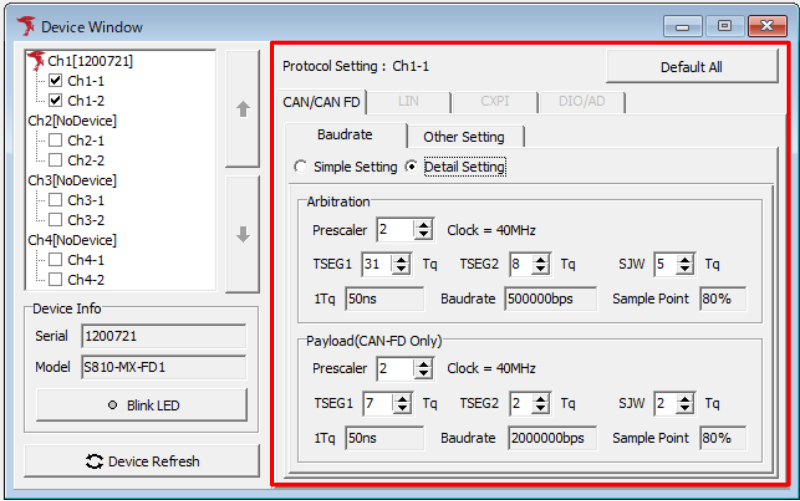
In Detail Setting, you can configure CAN/CAN FD communication timing in detail using Prescaler, TSEG1, TSEG2, and SJW.
When setting values are changed, 1Tq, Baudrate, and Sample Point are automatically calculated and displayed.
Normally, use Simple Setting. Use Detail Setting when it is necessary to match the bit timing of the connected device.
| Item | Description |
|---|---|
| Arbitration | Sets communication timing for the Arbitration phase. |
| Payload (CAN FD Only) | Sets communication timing for the Payload part of CAN FD. This is valid only when using CAN FD. |
| Prescaler | Value that divides the CAN clock. It affects the length of 1Tq. |
| TSEG1 | Sets the time segment before the sample point in Tq units. |
| TSEG2 | Sets the time segment after the sample point in Tq units. |
| SJW | Sets the time width that can be corrected during resynchronization in Tq units. |
| 1Tq | Displays the 1Tq time calculated from Prescaler. |
| Baudrate | Displays the communication baud rate calculated from Prescaler, TSEG1, and TSEG2. |
| Sample Point | Displays the sample point calculated from TSEG1 and TSEG2. |
A 40 MHz clock is used for calculation.
Baudrate is calculated from 40 MHz / Prescaler / (1 + TSEG1 + TSEG2), and Sample Point is calculated from (1 + TSEG1) / (1 + TSEG1 + TSEG2).
The setting ranges are as follows.
| Target | Prescaler | TSEG1 | TSEG2 | SJW |
|---|---|---|---|---|
| Arbitration | 1 to 1024 | 4 to 128 | 2 to 32 | 1 to 32 |
| Payload (CAN FD Only) | 1 to 256 | 2 to 16 | 2 to 8 | 1 to 8 |
The default values are as follows.
| Target | Prescaler | TSEG1 | TSEG2 | SJW |
|---|---|---|---|---|
| Arbitration | 2 | 31 | 8 | 5 |
| Payload (CAN FD Only) | 2 | 7 | 2 | 2 |
Other Setting Tab
In the Other Setting tab, you can set Ack response from MicroPeckerX, MicroPeckerX terminator ON/OFF, and transceiver delay correction.
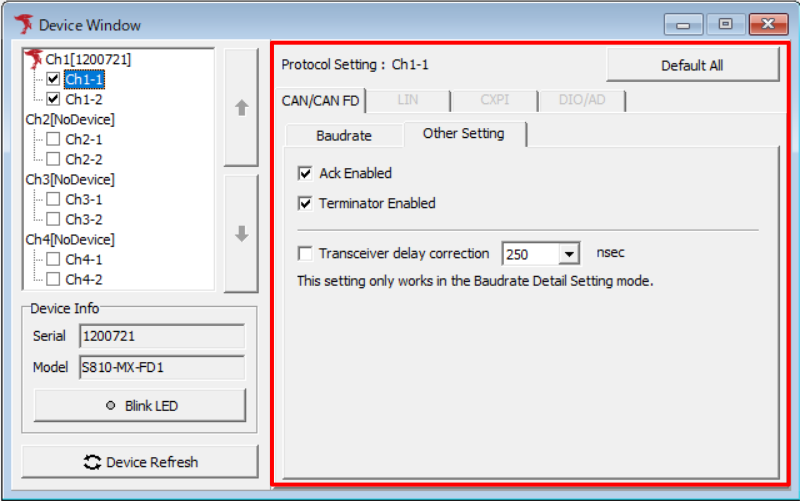
| Item | Description |
|---|---|
| Protocol Setting | Displays selected channel information. |
| Baudrate/Other Setting tab switch | Switches Protocol Setting display between Baudrate and Other Setting. |
| Ack Enabled | Sets whether Ack response is sent from MicroPeckerX. Always enable this when simulation transmission is used. |
| Terminator Enabled | Turns MicroPeckerX terminator resistor ON/OFF. Check to enable terminator. |
| Transceiver delay correction | Enables transceiver delay correction. This is valid only when using Detail Setting. When checked, the delay time selected on the right is used as the correction value. |
| Delay time for Transceiver delay correction | Selects the delay time used for transceiver delay correction in nsec units. You can select from 25 to 1600 nsec in 25 nsec increments. The default is 250 nsec. |
| Default All button | Sets Protocol Setting of target channel to default values. Defaults are: - Ack Enabled: Enable - Terminator Enabled: Disable - Transceiver delay correction: Disable - Delay time for Transceiver delay correction: 250 nsec |