Composition
For detailed APIs and sequences, refer to the Common, CAN/CAN FD, and LIN sections according to your use case.
API Positioning
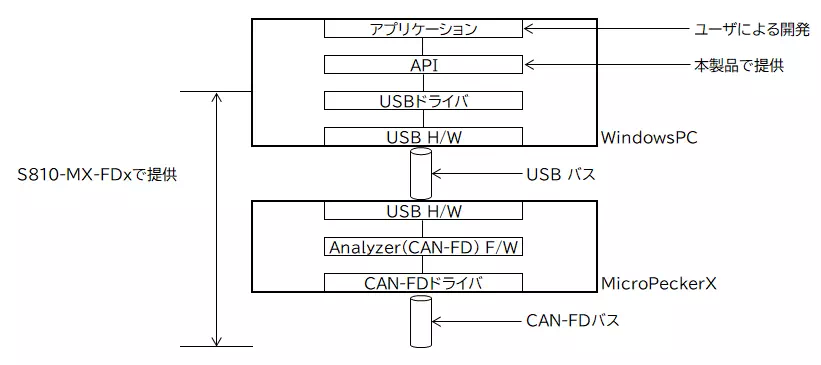
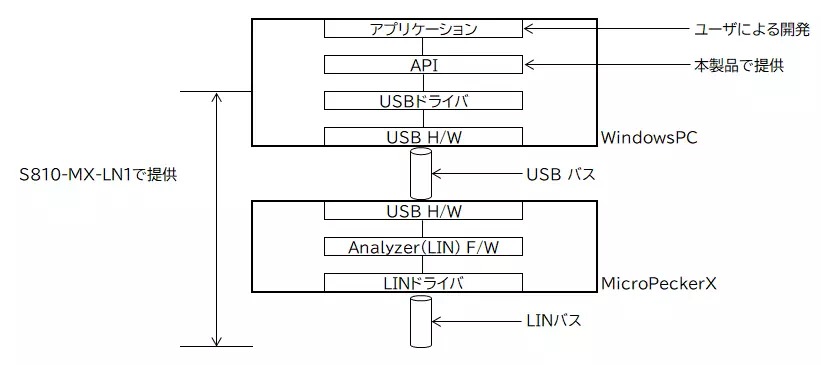
The relationship between the APIs provided by this product is shown below.
CAN/CAN FD Protocol
LIN Protocol
Package Composition
Library
The following table shows the structure of this product's library folder. "Storage folder" indicates the folder path relative to the root.
| Type | Overview | File name | Storage folder | Notes |
|---|---|---|---|---|
| Common Service API | Static library (ArmV8 version) | libMPXCtrlFree.a | Library/arm8_14-2-0_2-41 | gcc 14.2.0, glibc 2.41 |
| Dynamic library (ArmV8 version) | libMPXCtrlFree.so | Library/arm8_14-2-0_2-41 | gcc 14.2.0, glibc 2.41 | |
| Static library (x64 version) | libMPXCtrlFree.a | Library/x64_13-3-0_2-39 | gcc 13.3.0, glibc 2.39 | |
| Dynamic library (x64 version) | libMPXCtrlFree.so | Library/x64_13-3-0_2-39 | gcc 13.3.0, glibc 2.39 | |
| Library definition file | MPXCtrlFree.h | Library |
When developing an application with this product, you need either the static library or the dynamic library appropriate for your environment, as well as the library definition file.
Sample Programs
| Type | Overview | Storage folder |
|---|---|---|
| Sample programs for CAN FD | G++ monitor program | SampleProgram/MPXCtrl_CANFD_GPP_MonSample |
| G++ simulation program | SampleProgram/MPXCtrl_CANFD_GPP_SimSample | |
| Python monitor program | SampleProgram/MPXCtrl_CANFD_Python_MonSample | |
| Python simulation program | SampleProgram/MPXCtrl_CANFD_Python_SimSample | |
| Sample programs for LIN | G++ monitor program | SampleProgram/MPXCtrl_LIN_GPP_MonSample |
| G++ master simulation program | SampleProgram/MPXCtrl_LIN_GPP_MstSample | |
| G++ slave simulation program | SampleProgram/MPXCtrl_LIN_GPP_SlvSample | |
| Python monitor program | SampleProgram/MPXCtrl_LIN_Python_MonSample | |
| Python master simulation program | SampleProgram/MPXCtrl_LIN_Python_MstSample | |
| Python slave simulation program | SampleProgram/MPXCtrl_LIN_Python_SlvSample |
For the contents and usage of the sample programs, refer to CAN/CAN FD Sample Programs and LIN Sample Programs.
Installing the USB Driver for MicroPeckerX
Install the USB driver compatible with MicroPeckerX.
Download the D2XX driver for your architecture from the following FTDI Chip website.
FTDI Chip Drivers
Install the downloaded file in the specified location.
After installation, run sudo ldconfig or a similar command so that the library can be loaded.
User Write Permission Settings (First Time Only)
In the initial state, applications created using ADL, which is a user-mode driver, can be executed only with root privileges. A script is provided to automatically configure the settings required to execute these applications without using root privileges.
Use the following procedure.
- Store
mpx_devrule.tgzin any directory. - Extract the file stored in step 1. This creates the
mpx_devruledirectory. - Run
devrule_instin the directory created in step 2 with root privileges.