Microsoft Visual Basic .NET Sample Program
Microsoft Visual Basic .NET Simulation Program
Screen Layout
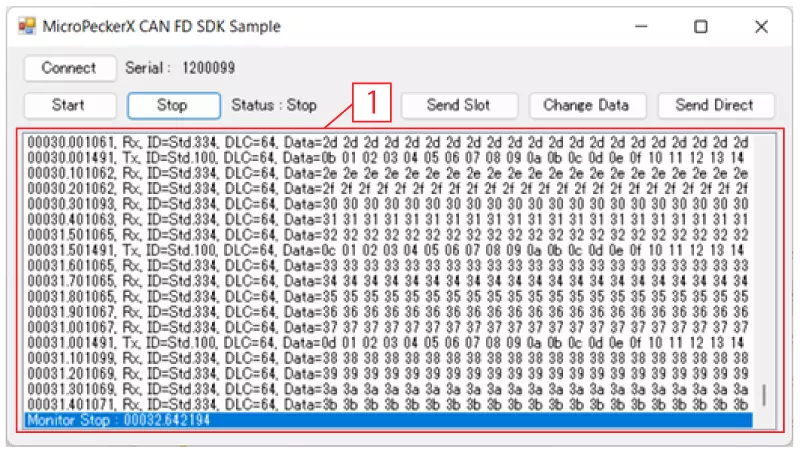
| Item | Description
---|---|---
- | Connect button | Recognizes MicroPeckerX connected to the PC when clicked.
- | Start button | Starts monitoring and transmits periodic preset frames every 0.5 seconds when clicked.
- | Stop button | Stops monitoring and periodic preset frame transmission when clicked.
- | Send Slot button | Sends the event-transmission preset frame when clicked.
- | Change Data button | Changes data of the periodic preset frame (D1 only) to
00Hwhen clicked. - | Send Direct button | Sends the direct-transmission preset frame when clicked.
1 | Log display area (*1) | Displays transmitted/received log information. Up to 1024 log entries are retained. When exceeded, older logs are cleared first.
If monitoring is stopped and started again, all previous logs are cleared.
Log Display Details
Display format is as follows, and fields are comma-separated.
| Item | Description
:---:|---|---
1 | (No item name) | Displays timestamp in sssss.mmmuuu format.
2 | Rx/Tx | Displays log direction.
Rx: received log, Tx: transmitted log
3 | ID | Displays CAN ID and ID format. CAN ID is shown in hexadecimal, and ID format is shown as below.
Std: standard ID, Ext: extended ID
4 | DLC | Displays data length (1 to 64).
5 | Data | Displays data (D1 to D64) in hexadecimal. Data is space-separated.
Preset Frames
The contents of each preset frame are as follows.
| Frame Type | Slot | Protocol | ID | DL | Data (Hex) | ||||||
|---|---|---|---|---|---|---|---|---|---|---|---|
| Format | CAN ID | D1 | D2 | ... | D8 | ... | D64 | ||||
| Periodic preset frame (*1) | 1 | CAN FD | Standard ID | 100H | 64 | 00 | 01 | ... | 07 | ... | 3F |
| Event-transmission preset frame | 2 | CAN | Standard ID | 200H | 8 | 20 | 21 | ... | 27 | ||
| Direct-transmission preset frame | - | CAN FD | Standard ID | 300H | 8 | 30 | 31 | ... | 37 | ||
*1: Only D1 is incremented (+1) on each transmission.